04 · Game pad, wheel and buzzer
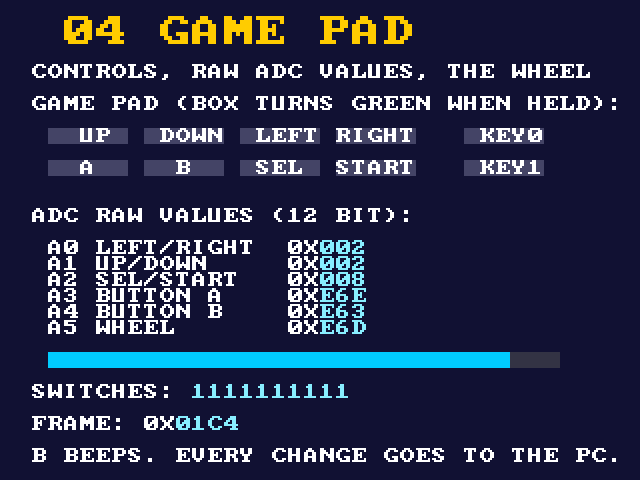
Every control on the LCD shield is read through the MAX 10's analog-to-digital converter. This example shows them all on the screen, beeps on B, and reports every change to your PC with the raw ADC value.
The repo keeps the full project (.qar, plus the sources here) but no prebuilt bitstream: one build (a few minutes) makes the .sof on your computer.
What you will see
| Where | What |
|---|---|
| Screen | A box per control (green while held), the six raw ADC readings, the wheel as a bar, the switches, a frame counter |
| HEX3..HEX0 | The wheel, 0 to 4095 |
| LEDs | LEDR9..6 Left Right Up Down, LEDR5..4 KEY1 KEY0, LEDR3..0 Start Select B A |
| Shield | The buzzer beeps (2 kHz) while B is held; the status LED is on while any control is held |
| Your PC | PRESS A ch3=02F, RELEASE A ch3=E47, WHEEL 2048: one line per change |
How the controls are read
The shield has no digital button pins: each control changes a voltage on one of the MAX 10 ADC's inputs, and the FPGA decides from the 12-bit reading. Two buttons share a channel by giving different voltages.
| ADC channel | Controls | Decode | Reading at rest (this board) |
|---|---|---|---|
| a0 | Left / Right | Left above 0xCFF; Right between 0x5FF and 0xCFF | 0x002 |
| a1 | Up / Down | Up above 0xCFF; Down between 0x5FF and 0xCFF | 0x001 |
| a2 | Select / Start | Select above 0xCFF; Start between 0x5FF and 0xCFF | 0x007 |
| a3 | A | pressed below 0x800 | 0xE47 to 0xE6E |
| a4 | B | pressed below 0x800 | 0xE3E to 0xE63 |
| a5 | Wheel | 0 to 4095 | jitters by about 33 steps |
The readings at rest are measured on the board (Signal Tap and the screen). The press values come from the
template's decode; the press-by-press check of every control is still to do (press each one with
python scripts/de10.py log 60 running and compare the chN= values with this table).
Block diagram
The template's ADC needed three fixes
Building this example found that the arcade template's ADC setup is wrong, although it seems to work:
- A typo in the generated IP (
adc_adc_0.v) set the PLL's multiplier twice and never its divider. - The IP's PLL was declared for 100 MHz in while the template fed it 25 MHz. Together: the ADC ran at 12.5 MHz, above the MAX 10's 10 MHz ADC clock.
- Altera's timing constraints for the ADC were missing, so every build reported a −868 ns timing failure.
All three are fixed in lib/rtl/adc: give gamepad 50 MHz and the ADC runs at exactly 10 MHz with clean
timing. If you use the original template's files you will see Critical Warning 15042 and failing timing on wire_from_adc_dout.
Other things worth knowing
- Debounce (
lib/rtl/debounce.sv): a value counts only after 10 ms without change. - The wheel jitters by about 33 steps at rest; report it only when it moves more than 64.
- Clock crossing: the game pad lives at 50 MHz, the screen and USB link at 25 MHz. The event text crosses through
lib/rtl/byte_cdc.sv, a small dual-clock FIFO with Gray-coded pointers. - Torn numbers: the screen latches every value once per frame (during vsync), so a digit never changes half way down.
- Fitter Critical Warning 16248 (VGA_HS / VGA_VS placed near ADC pins) is the board's layout, not your design.
Run it
python scripts/de10.py build examples/04_gamepad
python scripts/de10.py program examples/04_gamepad
python scripts/de10.py log 60          # press each control once
python scripts/de10.py send "?"        # a full status line
python scripts/de10.py screen logs/pad.png
Build it yourself
python scripts/new_project.py examples/04_gamepad gamepad_top --lib display gamepad debug font print mux cdc debounce bcd sevenseg
python scripts/de10.py build examples/04_gamepad
Resources: 3,354 logic elements (7 %), memory 56 % (the screen read-back buffer). Timing: no negative slack.
Files
| File | What |
|---|---|
src/gamepad_top.sv | Top: ADC, debounce, screen, buzzer, LEDs, USB |
src/gamepad_screen.sv | The screen (values latched per frame) |
src/gamepad_events.sv | Event lines for the PC |
lib/rtl/gamepad.sv, analog_input.sv, adc/ | The ADC and decode (with the fixes) |
lib/rtl/debounce.sv, byte_cdc.sv | Debouncer; byte FIFO between two clocks |